

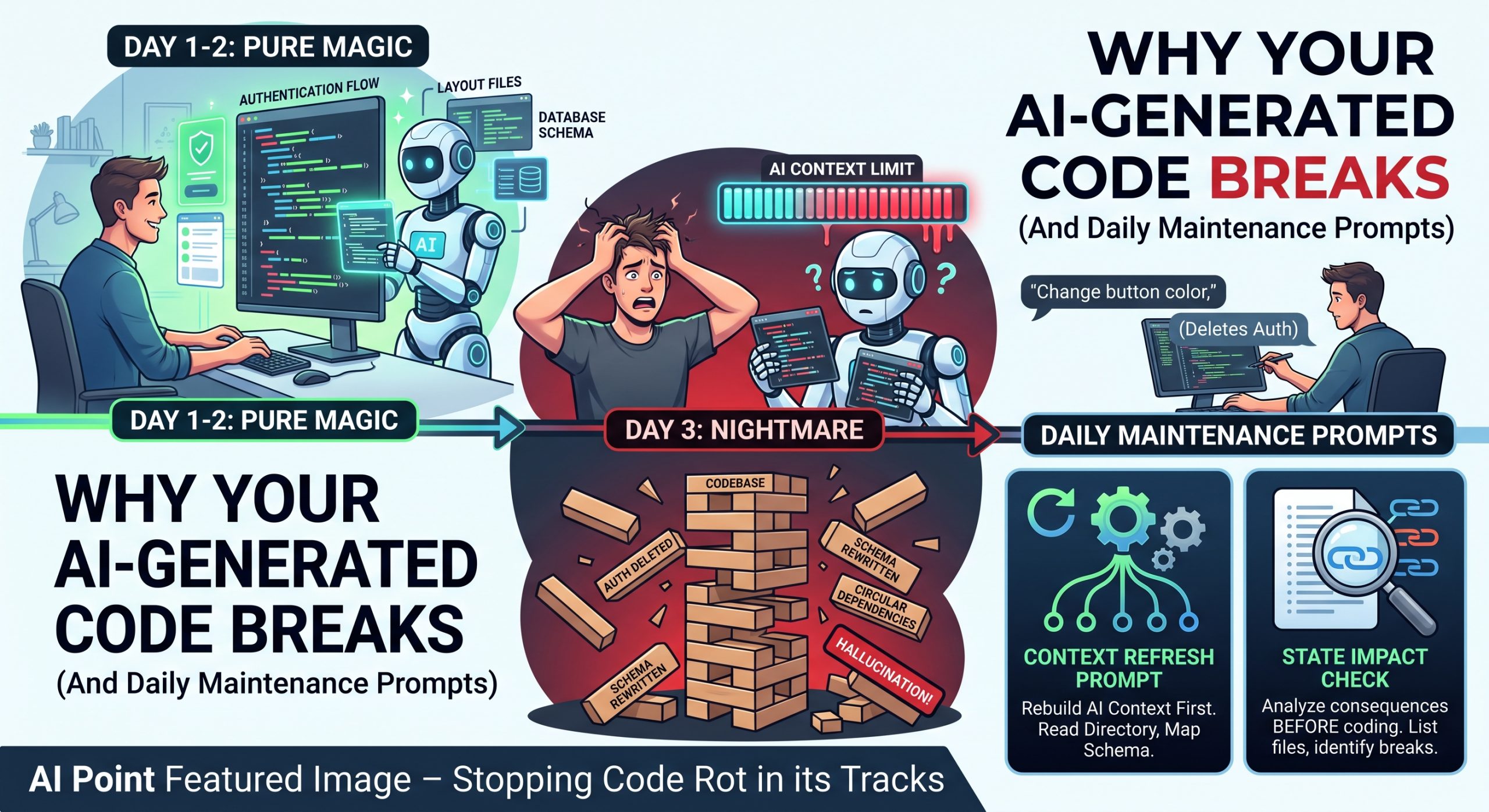
Day 1 of building a new web application with AI is pure magic.
You type a prompt. It generates the code. Everything works perfectly.
Day 2 is highly productive. You add a few new features, tweak the UI, and seamlessly connect your database.
But Day 3?
Day 3 is an absolute nightmare.
You ask the AI to change a simple button color on the dashboard, and it confidently deletes your entire authentication flow. You ask it to fix a typo, and it completely rewrites your database schema.
What on earth happened?
In this guide here at AI Point, I am going to show you exactly why your AI-generated codebase suddenly crumbles.
More importantly, I am going to give you the exact daily maintenance prompts you need to stop this code rot in its tracks.
Let’s dive in.
Understanding the “Cascade Failure”
When you start a fresh project, the AI is incredibly smart.
If you followed our initial architectural prompting blueprint, your app started out flawlessly. The AI knew exactly where your files were. It understood your component structure. It respected your tech stack.
But here is exactly how you protect that foundation as the codebase scales.
Because Large Language Models (LLMs) have a hidden, highly destructive enemy: the context limit.
Every time you paste in a new file, ask a new question, or run a new bug fix, the AI’s “memory window” fills up.
By Day 3, that window is completely overflowing. The AI literally forgets the core architecture you established on Day 1.
It starts hallucinating new state management systems. It duplicates code across multiple files. It creates circular dependencies that crash your server.
I call this the Cascade Failure.
One small hallucination leads to a broken feature. You ask the AI to fix that feature. The AI panics and breaks two more features in the process.
Suddenly, your pristine app is a tangled mess of spaghetti code. You end up spending five hours debugging a project that took you one hour to build.
To fix this, you have to stop treating the AI like an omniscient machine. You have to start managing it like a forgetful junior developer.
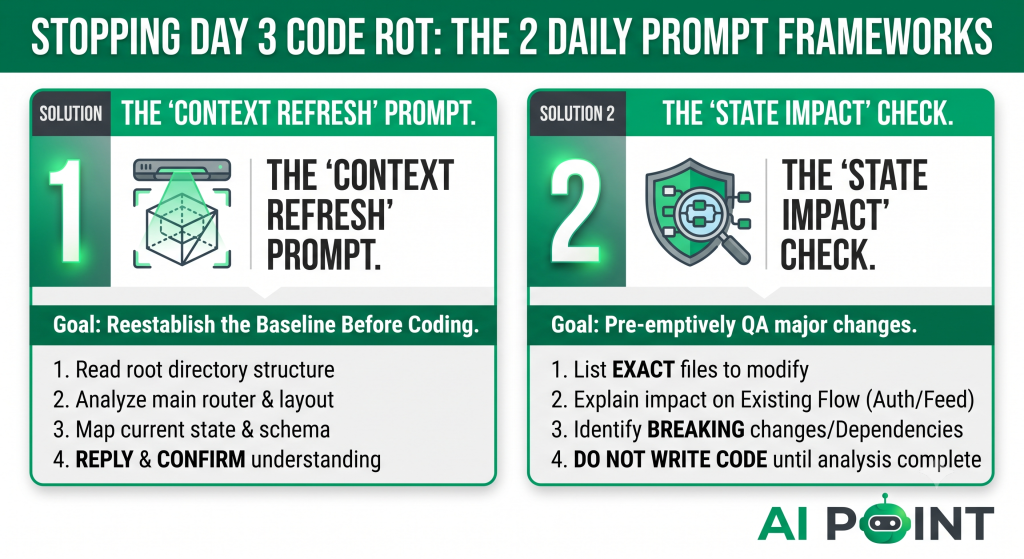
And that requires two specific prompting frameworks.
Solution 1: The “Context Refresh” Prompt
The single biggest mistake developers make on Day 3 is jumping right back into coding.
They open up their IDE, start a fresh chat session, and confidently say: “Add a user profile settings page.”
Stop doing this immediately.
When you start a new session, the AI’s memory is wiped clean. It doesn’t know what you built yesterday. It doesn’t know how your database is structured.
Before you ask it to write a single line of new code, you must force it to read the current state of your project.
You do this using a Context Refresh Prompt.
For example, when I was engineering the localized administrative login system for a custom fundraising web app called funds Daniel, I noticed a huge problem. The AI kept forgetting my highly specific manual payment tracking routes every single morning.
So, I started using this exact prompt at the beginning of every single coding session:
“STOP. Do not write any code yet. I am about to ask you to build a new feature. But first, you must rebuild your context. 1. Read the current root directory structure. 2. Analyze the main router and layout files. 3. Map out the current global state flow and database schema. Reply with a short, bulleted summary of my architecture to confirm you understand it. Wait for my next prompt before generating any new code.”
Why is this so effective?
Because it forces the AI to look at the actual code that exists today, not the code it assumes you have based on generic training data.
It re-establishes the baseline. It locks the AI back into your specific architecture before it is allowed to touch anything.
Solution 2: The “State Impact” Check
Okay, the AI remembers your architecture. Now you can safely ask for the new feature.
But there is still a massive trap here.
If you ask the AI to refactor a core component, it will blindly execute it. It will write the code instantly, even if that code completely destroys three other pages in your app.
To prevent this, you must force the AI to act as its own Quality Assurance (QA) tester.
I call this the State Impact Check.
Before the AI is allowed to rewrite a file or add a complex feature, you make it map out the exact consequences of its actions.
Let’s say you are planning the development of a modern social media application and you want to replace traditional likes with a coin-based wallet system for purchasing post interactions.
Whenever you request a major architectural change like this, use this exact prompt formula:
“I need to add a coin-based wallet system to the existing social feed. Before you write ANY code for this, you must run a State Impact Check. 1. List the exact 3-5 files this new feature will modify. 2. Explain exactly how this change will impact the existing user authentication flow. 3. Identify any potential breaking changes, prop drilling issues, or circular dependencies this might cause. Do not write the feature yet. Give me your impact analysis first.”
Look at what this prompt does.
It forces the AI to slow down. It forces it to logically trace the data flow before it overwrites your perfectly good code.
If the AI realizes that changing the feed will break the login screen, it will tell you in the analysis.
You catch the catastrophic bug before it even exists in your codebase.
Conclusion
Building a complex, full-stack app with AI is actually the easy part.
Maintaining that app over weeks and months is hard.
But it doesn’t have to be.
By understanding the absolute limits of the AI’s context window, you can stop Cascade Failures before they start.
Using Context Refresh Prompts at the start of your day, and strict State Impact Checks before major refactors, will keep your codebase clean, scalable, and bug-free for months on end.
You are no longer just a prompt generator typing in random ideas. You are a true AI Software Architect.
Now I want to turn it over to you:
What is the most frustrating, head-scratching bug an AI has ever hallucinated into your project?
Did it randomly delete your CSS file? Did it break your entire database schema while trying to fix a typo?
Let me know by leaving a quick comment below right now.
