

Let’s be honest for a second.
You can have the cleanest code in the world. You can have a perfectly responsive Tailwind layout.
But if your web application is just a static grid of text and generic stock icons, it is going to look cheap.
Users today expect a premium experience.
They want interfaces that feel alive. They expect custom illustrations, smooth micro-interactions, and elements that react instantly to their cursor.
Historically, this was the hardest part of frontend development.
If you wanted custom vector graphics, you had to hire a designer or spend hours dragging anchor points around in Adobe Illustrator. If you wanted smooth animations, you had to write lines and lines of complex CSS keyframes.
Not anymore.
You can now use Large Language Models to generate these highly complex visual assets entirely from scratch.
Today, I am going to show you exactly how to use AI to generate custom SVG graphics and web animations just by typing out a few sentences.
Let’s dive in.
Why AI Excels at Vector Graphics
When most people think of AI image generation, they think of tools like Midjourney or DALL-E generating pixel-based JPEGs.
But as a frontend developer, you do not want JPEGs. You want SVGs (Scalable Vector Graphics).
Here is a crazy fact that most developers overlook:
An SVG is not really an image. It is just math.
It is a text file written in XML that plots coordinates on a mathematical grid.
And what do Large Language Models excel at? Code and math.
This means you can ask an AI agent to generate completely unique, mathematically perfect vector graphics using nothing but natural language.
You don’t need to hunt for generic icons on FontAwesome anymore. You can build exactly what you need.
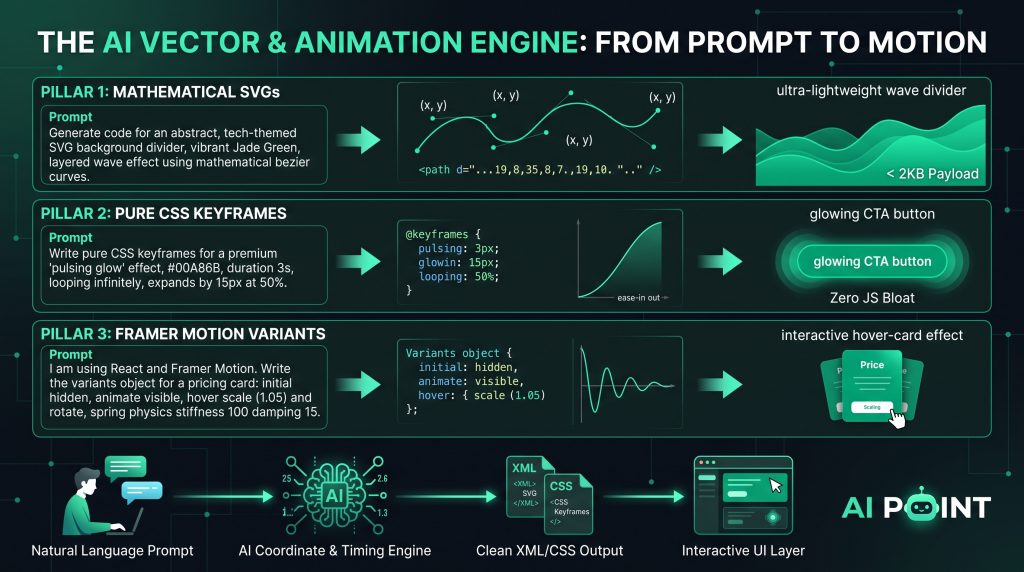
Here is an example of a prompt that generates a stunning, custom asset:
Role: You are an expert UI designer and SVG engineer. Task: Generate the raw code for an abstract, tech-themed SVG background divider. Constraints:
The SVG must be responsive with a
viewBoxof0 0 1440 320.Create a layered wave effect using exact mathematical bezier curves (
path d="...").The primary color must be a vibrant Jade Green (exactly
#00A86B).Add a subtle opacity gradient to the bottom layer.
Output strictly the SVG code, no markdown wrappers.
When you run this prompt, the AI does the heavy lifting.
It calculates the exact x and y coordinates for those bezier curves. It applies your exact brand hex code.
You copy the output, drop it directly into your Next.js project, and you instantly have a high-end, custom graphic that weighs less than 2 kilobytes.
It is a total game-changer.
Prompting for Complex CSS Keyframes
Static graphics are great.
But to really make an interface pop, you need motion.
Writing CSS keyframes manually is a notoriously tedious process. You have to calculate percentages, manage timing functions, and pray that your easing curves don’t look robotic.
Because of this, many developers just rely on heavy, bloated animation libraries to do the work for them.
You do not need to do that anymore.
You can use AI to generate complex, pure CSS animations in seconds.
The trick here is to prompt for the feeling and the timing, rather than the syntax.
Here is a prompt structure you can steal to generate advanced CSS animations:
Task: Write pure CSS keyframes for a premium “pulsing glow” effect to be applied to a primary call-to-action button. Animation Logic:
Total duration: 3 seconds, looping infinitely.
At 0%, the button has a soft
#00A86Bbox-shadow.At 50%, the box-shadow expands outward by 15px, increases in blur, and slightly shifts to a brighter green.
At 100%, it returns seamlessly to the original state. Output: Provide just the
@keyframesblock and the CSS class needed to apply it. Use a smooth ease-in-out timing function.
The AI will spit out the exact CSS you need.
No external libraries. No javascript bloat. Just lightweight, highly performant CSS motion that makes your buttons practically beg to be clicked.
Orchestrating Micro-interactions with Framer Motion
Now, let’s take things one step further.
If you are building complex React applications, CSS keyframes sometimes aren’t enough. You need animations that are tied directly to your component lifecycle. You need elements to animate when they mount, when they unmount, or when the React state changes.
For this, the gold standard is Framer Motion.
And thankfully, AI models are incredibly good at writing Framer Motion variants.
A variant is basically a set of states (like hidden, visible, and hover) that Framer Motion interpolates between.
Instead of reading through Framer’s documentation to figure out the exact syntax for a spring animation, you can just ask your AI co-pilot.
Use a prompt like this:
Task: I am using React and Framer Motion. Write the
variantsobject for a pricing card component. Interaction Requirements:
initial: The card is 20px lower than its final position and has an opacity of 0.
animate: The card slides into place and fades to opacity 1. Use aspringtransition with a stiffness of 100 and damping of 15.
hover: When the user hovers over the card, it should scale up slightly (1.05) and rotate 1 degree to the right.
Because Framer Motion relies heavily on structured objects and predictable syntax, the AI nails this almost every single time.
You get a buttery-smooth, physics-based micro-interaction without having to manually tweak the spring stiffness for an hour.
Your UI immediately feels tactile, premium, and professional.
Elevating the User Interface
At the end of the day, layout and structure are just the foundations of your web application.
They are the framing of the house.
But the custom graphics, the smooth transitions, and the physics-based hover states? Those are the interior design. That is what your users actually notice.
While generating basic responsive layouts is the core of our guide to AI-assisted frontend development, mastering AI-generated SVGs and animations is what makes those layouts feel alive.
It is what separates a generic AI-generated template from a world-class digital product.
Conclusion
We are entering a new era of web design.
The barrier to entry for creating highly custom, interactive visual assets has dropped to zero.
You do not need an illustration background to generate stunning SVGs. You do not need to be a math genius to write physics-based keyframes.
All you need is a clear vision and the ability to articulate that vision into a structured prompt.
Start small. Ask your AI agent to generate a custom SVG wave divider for your next project, or have it write a simple hover animation for your buttons.
Once you see the results, you will never want to go back to static templates again.
Now, it is your turn.
Have you tried using AI to generate SVGs before, or do you usually stick to icon libraries?
