


The software engineering landscape is undergoing a fundamental transformation. For years, developers relied on standard text editors paired with intelligent autocomplete extensions to speed up boilerplate generation. Today, that approach is rapidly becoming obsolete. When managing complex, multi-file enterprise applications, bolting an AI tool onto a legacy editor simply does not provide the deep, architectural understanding required to maintain engineering velocity.
In 2026, the standard has shifted toward AI-native Integrated Development Environments (IDEs). Within this highly competitive space, two platforms have emerged as the definitive leaders: Cursor and Windsurf.
Both of these tools promise to revolutionize the way engineering teams handle large-scale codebases. However, when tasked with complex refactoring across hundreds of interconnected files, their underlying architectures and user experiences diverge significantly. This comprehensive guide provides a technical comparison of Cursor and Windsurf, evaluating their codebase indexing, user interfaces, security protocols, and overall performance for multi-file projects.
Why “AI-Native” Architecture is the New Standard
To understand the value of tools like Cursor and Windsurf, we must first examine the limitations of earlier AI coding assistants. First-generation tools operated strictly within the active editor tab. If a developer prompted the AI to update a database schema, the model had no awareness of the downstream frontend components or API routes that would subsequently break.
AI-native IDEs solve this problem by integrating the large language model (LLM) directly into the core architecture of the editor. This allows the AI to parse the local file system, read terminal outputs, analyze Abstract Syntax Trees (AST), and understand the global state of the application before generating a single line of code.
If you are new to this massive shift in developer tools, check out our complete guide on the evolution of autonomous AI coding agents, where we break down how these local tools fit into the broader tech ecosystem.
For multi-file projects, this native architecture is not just a luxury; it is a necessity. It empowers developers to execute system-wide updates, ensuring that dependencies, types, and imports remain perfectly synchronized across the entire repository.
Deep Dive: The Codebase Indexing Battle
The true test of an AI IDE is its ability to comprehend a massive repository without suffering from “hallucinations” or missing critical context. This capability relies entirely on how the editor handles codebase indexing.
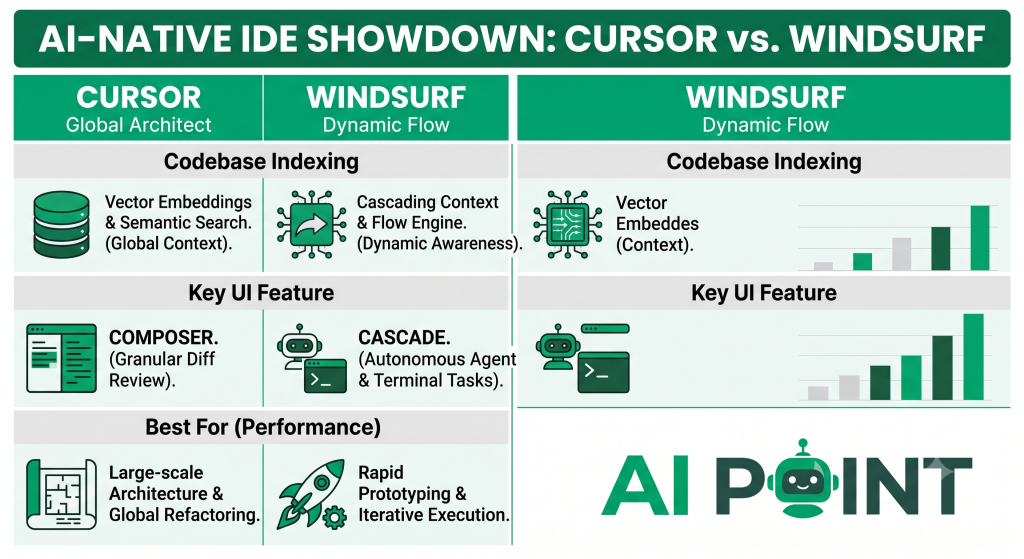
Cursor’s Context Engine (Vector Embeddings)
Cursor approaches codebase comprehension through a highly optimized vector embedding pipeline. When you open a repository, Cursor silently indexes your entire local directory in the background. It chunks your code, generates embeddings, and stores them in a local vector database.
When a user submits a prompt, Cursor’s engine performs a semantic search across this database. This means if you ask it to “update the authentication middleware to support role-based access,” Cursor instantly retrieves the relevant authentication controllers, database models, and route definition files—even if they are buried deeply in separate folders. Its ability to maintain global context across massive, 1,000+ file repositories is currently unmatched in the industry.
Windsurf’s Cascading Context (Dynamic Flow)
Windsurf takes a distinctly different, more dynamic approach powered by its proprietary “Flow” engine. Rather than relying solely on static, up-front vector indexing, Windsurf operates as an active observer of your development process.
Windsurf continuously monitors your cursor position, the files you recently modified, your active terminal sessions, and your editor tabs. It builds a highly accurate, localized context window based on your immediate actions. For many developers, this results in faster, more highly relevant suggestions for the specific task at hand, as the AI dynamically infers intent based on recent workflow patterns rather than purely semantic codebase searches.
UI/UX: Navigating the Multi-File “Flow State”
A powerful AI model is effectively useless if the user interface introduces friction. The best developer tools operate invisibly, keeping engineers locked in the “flow state.” Cursor and Windsurf offer two distinct philosophies regarding how developers should interact with AI agents.
Cursor’s Composer System
Cursor’s standout feature for multi-file orchestration is a system called “Composer.” Triggered via a simple keyboard shortcut, Composer opens a dedicated interface where developers can submit complex, multi-step instructions.
The primary advantage of Composer is its diff-based review system. When Cursor modifies multiple files, it does not blindly overwrite your code. Instead, it presents a side-by-side visual diff for every single affected file. Developers retain granular control, allowing them to carefully accept, reject, or manually adjust changes line-by-line before saving. For senior engineers managing mission-critical code, this high-visibility approach provides necessary peace of mind.
Windsurf’s Cascade Interface
Windsurf counters with “Cascade,” a highly fluid, chat-centric interface designed to act as a real-time pair programmer. Cascade is uniquely integrated with both the file tree and the terminal environment.
When you assign a task to Windsurf, it can autonomously write code, execute bash scripts in the terminal to test that code, read the subsequent error logs, and iterate on its own solutions. The UI streams these actions dynamically. While it offers slightly less granular, line-by-line diff control than Cursor, it compensates by drastically reducing the manual steps required to execute, test, and debug an application.
Real-World Performance Test: Refactoring a Microservice
To move beyond theoretical architecture, we evaluated both IDEs against a standard enterprise scenario: modifying a core TypeScript interface and ensuring all downstream services updated correctly within a 400-file full-stack application.
The Test Parameters: We prompted both tools to add a new subscription_tier field to a global User interface, update the corresponding PostgreSQL database migration script, and adjust the frontend React components that fetch this data.
Cursor’s Performance: Cursor identified all 14 files affected by the interface change almost instantaneously. Using Composer, it generated accurate diffs for the database schema, the backend controllers, and the frontend UI. The type safety was maintained perfectly. The entire process took approximately 15 seconds of compute time, followed by 30 seconds of human review.
Windsurf’s Performance: Windsurf’s Cascade feature immediately recognized the interface update based on the active tab. It successfully updated the backend logic and even attempted to run the database migration command in the terminal. However, because one frontend component was not recently accessed or semantically linked in its immediate flow, Windsurf missed updating a specific React prop, requiring a brief follow-up prompt to correct.
The Verdict on Performance: Cursor provides superior global accuracy for sweeping architectural changes, while Windsurf excels at rapid, localized execution and automated terminal testing.
Security, Privacy, and Enterprise Readiness
For technical leaders managing intellectual property in North America, the UK, and global tech hubs, data privacy is a non-negotiable requirement. Both platforms have matured to meet rigorous enterprise standards.
-
Data Privacy: Both Cursor and Windsurf feature explicit “Privacy Mode” toggles. When enabled, this ensures that proprietary enterprise code is never logged, stored, or utilized to train future public language models.
-
Compliance: Cursor’s Enterprise tier offers strict SOC2 compliance, centralized billing, and organizational policy enforcement, making it highly attractive for large-scale engineering departments. Windsurf is rapidly expanding its enterprise offerings, focusing heavily on custom team governance and secure API deployments.
-
Pricing: Both tools offer highly competitive Pro tiers ranging between $15 to $20 per user, per month. Given the quantifiable reduction in development cycle times, the return on investment (ROI) for either tool is virtually immediate for professional teams.
Final Verdict: Which AI IDE Should Your Engineering Team Adopt?
The decision between Cursor and Windsurf ultimately comes down to your team’s specific development workflows and repository architecture.
Adopt Cursor if: Your engineering team manages massive, highly interconnected codebases where comprehensive global indexing is critical. If your developers prefer maintaining strict, line-by-line control over AI-generated diffs during complex refactoring operations, Cursor’s Composer interface is the premier choice on the market.
Adopt Windsurf if: Your team prioritizes rapid prototyping, iterative development, and seamless terminal integration. If your developers want an agent that feels less like a search tool and more like an active collaborator capable of running tests and debugging on the fly, Windsurf’s Cascade engine provides an unparalleled, frictionless experience.
Frequently Asked Questions (FAQ)
Can Cursor and Windsurf replace my current engineering team? Absolutely not. Autonomous AI coding agents are productivity multipliers, not replacements. They excel at writing boilerplate, refactoring structural logic, and identifying bugs, freeing up human engineers to focus on high-level system architecture, security, and strategic business logic.
Do these tools work completely offline? No. While both tools index your codebase locally on your machine, the heavy lifting of code generation and reasoning requires an internet connection to communicate with foundational LLMs like Claude 3.5 Sonnet or GPT-4o.
Are AI-native IDEs better than standard GitHub Copilot? For multi-file, complex projects, yes. Standard GitHub Copilot functions primarily as an advanced autocomplete tool within the active file window. AI-native IDEs like Cursor and Windsurf possess full-repository awareness, allowing them to coordinate changes across hundreds of files and execute terminal commands—capabilities that standard extensions simply cannot match.
