


Does this sound familiar?
You have a killer idea for a web app, a new feature, or an internal tool.
But there’s a problem: your engineering team is backed up for months. And you don’t know how to code.
Here’s the deal:
That bottleneck doesn’t exist anymore.
In early 2025, Andrej Karpathy coined the term “vibe coding.” Fast forward to 2026, and this concept has completely taken over how digital products are built.
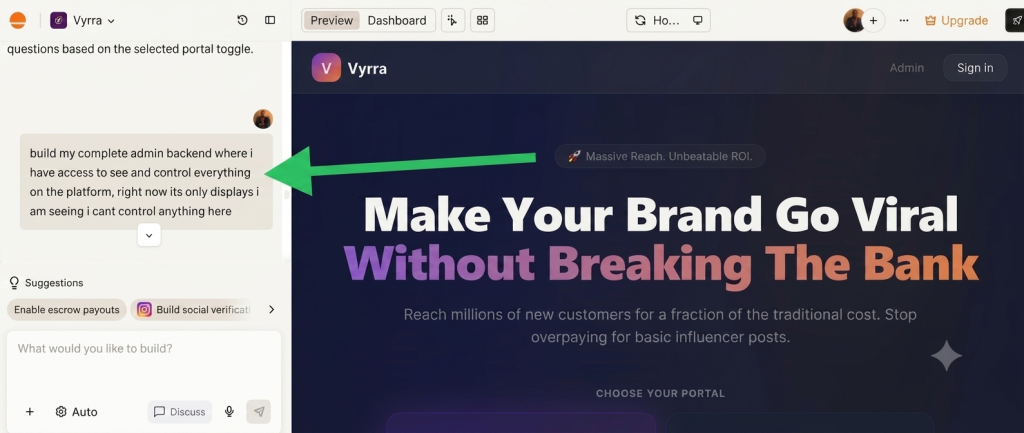
Today, the best growth teams aren’t waiting on developers to write manual syntax. They are acting like Product Managers—steering AI models using plain English to ship real, working software in record time.
If you want to build and launch products faster than ever, you are in the right place. In this guide, I’m going to show you exactly how to do it.
Specifically, you’ll learn:
- What “vibe coding” actually is (and why it matters for growth).
- The absolute best AI web builders for rapid prototyping.
- How to use AI code assistants and autonomous agents to build apps from scratch.
- The exact workflow to take an MVP from a simple text prompt to a live launch.
Ready to stop typing code and start shipping?
Let’s dive right in.
The Shift from Manual Typing to Vibe Coding
Let’s be honest:
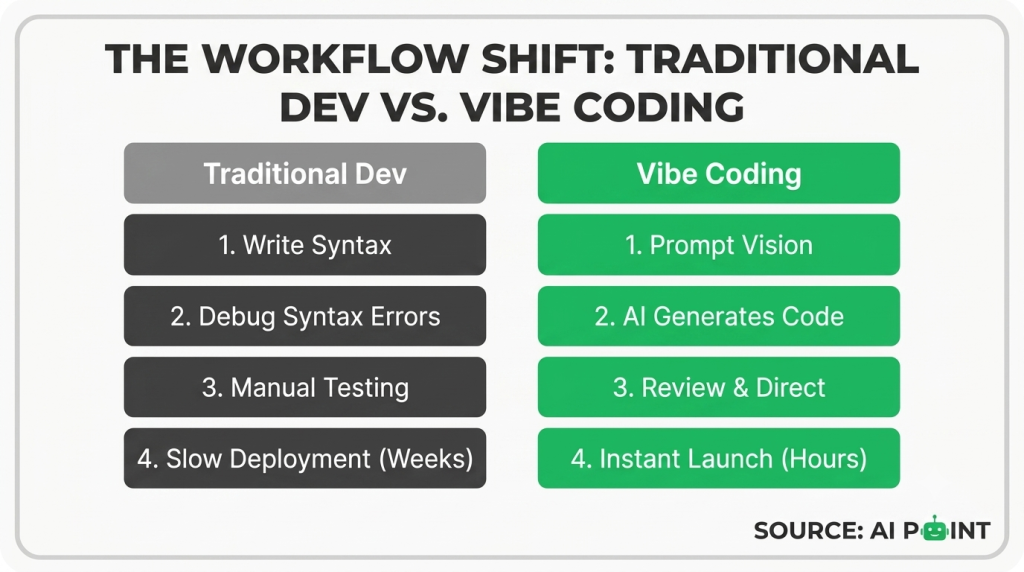
Traditional software development is slow.
In the past, bringing a new feature or web application to life meant writing hundreds of lines of boilerplate code line-by-line.
You wrote syntax. You hit a bug. You spent three hours on Stack Overflow searching for a fix.
Repeat that process fifty times, and a single product feature took three weeks to ship.
Here’s the truth:
In 2026, typing code manually is fast becoming obsolete.
The New Paradigm: From “Writer” to “Director”
With vibe coding, your role completely changes.
You aren’t spending hours memorizing syntax or wrestling with framework configurations.
Instead? You act like a Film Director or Product Manager.
You describe the vision, set the constraints, and direct an AI model to generate the execution. When something breaks, you don’t hunt for missing semicolons. You simply give the AI feedback on the output.
The result? Development speed increases by 10x to 50x.
Why Growth Teams Are Winning with Vibe Coding
Why does this matter if you aren’t a full-time software engineer?
Because speed to market is the ultimate unfair advantage.
If you work in growth, performance marketing, or product, your success depends on testing hypotheses fast.
Before vibe coding, testing a new custom funnel or building an interactive user tool meant getting onto the engineering roadmap.
Now? You can prompt, prototype, and publish a functional interactive tool over a single weekend.
The bottleneck isn’t execution anymore. It’s how fast you can come up with high-value ideas and steer the AI to execute them.
Want to master the prompt-first mindset? Check out our detailed deep dive on what vibe coding actually is and how to start to see real-world prompt templates in action.
The Best AI Builders for Rapid Prototyping
Let’s get straight to the point:
The days of stitching together 15 different complicated SaaS tools to build a prototype are over.
If you want to build a web or mobile application today, you don’t need a massive tech stack. You just need a prompt and the right AI builder.
These browser-based, no-code and low-code platforms are completely changing the game. They don’t just generate a few lines of code. They generate entire, fully functional applications directly from your chat window.
But with so many new tools launching every week, which one should you actually use?
Let’s break down the three undisputed heavyweights in 2026.
1. Lovable: The King of Polished UI
When it comes to shipping a product that looks like a high-end design agency built it, Lovable is in a league of its own.
Most AI code generators struggle with design. They output blocky, outdated interfaces.
Lovable is different.
It is hyper-focused on generating highly polished, production-ready user interfaces right out of the gate. If you are building a SaaS dashboard, a landing page, or a customer-facing portal where aesthetics and user trust matter, this is your go-to tool. You simply describe the vibe, and Lovable handles the complex CSS and component styling.
2. Bolt.new: Built for Absolute Speed
If your primary goal is rapid full-stack iteration, Bolt.new is the tool you need in your arsenal.
Here is why Bolt.new is so powerful:
It runs an entire Node.js development environment directly in your browser. This means there is absolutely zero local setup required.
You can prompt a complete full-stack application, iterate on the database schema, and test complex backend logic in seconds. For growth marketers who want to test a dynamic lead-gen tool or a custom calculator over the weekend, Bolt.new offers massive speed.
3. Newly AI: The Native App Powerhouse
What if you don’t want a web app? What if you need a real, native mobile app in the iOS App Store?
Enter Newly AI.
While other builders focus on web views, Newly AI generates production-ready native iOS and Android apps using React Native and Expo.
It doesn’t just build the frontend. It automatically configures a complete Supabase backend (including your database and user authentication). Best of all, you own 100% of the source code. You describe the app in plain English, and Newly AI handles everything from the complex native build architecture to the App Store deployment.
Want to see how these tools stack up on cost?
For a deeper comparison of pricing and workflows, check out our ranking of the top AI web builders.
AI Code Assistants vs. Autonomous Agents
Here’s the truth about AI coding tools today:
The game has completely changed.
We aren’t just talking about fancy autocomplete anymore. We are talking about AI that builds entire software architectures from scratch.
But to get the most out of this new tech, you need to understand the difference between AI Code Assistants and Autonomous Agents.
It’s a massive distinction. And getting it wrong can cost you hundreds of hours in lost productivity.
Let’s break it down.
Code Assistants vs. Autonomous Agents: What’s the Difference?
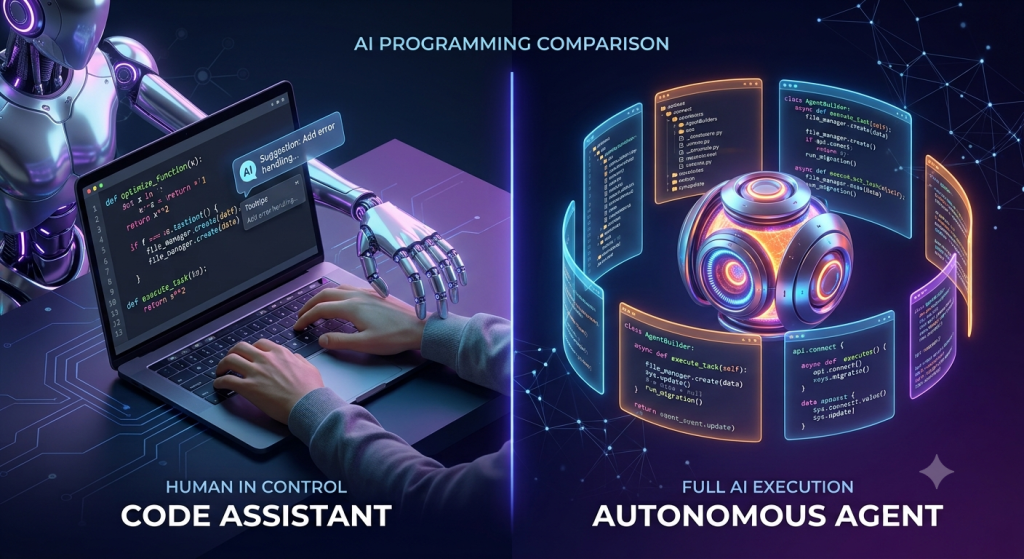
Think of an AI Code Assistant as a super-smart pair programmer.
It sits next to you. It watches you type. When you get stuck on a tricky function or forget a syntax rule, it whispers the right answer.
Tools in this category help you code. But make no mistake: you are still driving the car. You are in control of the file structure, the terminal, and the execution.
Autonomous Agents? They are a completely different beast.
You don’t just ask an agent for a snippet. You give it a high-level objective.
For example, you might say: “Build a user authentication flow, update the UI components, and connect it to our Postgres database.”
Then? The agent goes to work.
It writes the code. It navigates across dozens of multiple files. It runs terminal commands. It even debugs its own errors before showing you the result.
This massive leap in capability is exactly what is driving the shift from copilots to agents.
Now, let’s look at the specific tools leading this charge.
Cursor: The Industry Standard AI IDE
If you are moving away from traditional setups, Cursor is your first stop.
It’s a fork of VS Code. That means all your favorite extensions and custom shortcuts just work out of the box.
But Cursor isn’t a full agent. It’s the ultimate assistant.
Why? Because of its deep codebase integration. It indexes your entire repository to give you hyper-accurate, context-aware suggestions.
When you need a tool that intimately understands your existing code but still leaves you in total control of the execution, Cursor is the undisputed king.
Windsurf: The Agentic Powerhouse
Want to step fully into the autonomous zone? Enter Windsurf.
Windsurf introduces a groundbreaking feature called the “Cascade” system.
Unlike Cursor’s conversational approach, Cascade takes a true multi-step, agentic approach.
You give Windsurf a complex prompt, and Cascade breaks it down into actionable steps. It reads files, writes code across multiple directories, runs tests, and iterates on its own.
It doesn’t just suggest code; it actually does the work. If you want to build features 10x faster by delegating the heavy lifting, Windsurf is your go-to tool.
Claude Code: The Terminal-Native Boss
Some developers hate bulky IDEs. They live entirely in the terminal.
If that’s you, Anthropic’s Claude Code is exactly what you need.
Claude Code is terminal-native. It executes complex reasoning and actions directly from your command line.
Instead of clicking through a graphical interface, you can unleash Claude Code to grep through massive file trees, execute bash scripts, and rewrite deeply nested logic autonomously.
It’s built for power users who want autonomous capabilities without leaving their beloved CLI.
From Concept to Launch: Building MVPs with AI
Let’s get practical.
Theory is great. But at the end of the day, you are reading this because you want to get a live product into the hands of real users.
How do you actually take an idea from a text prompt to a fully functional Minimum Viable Product (MVP)?
Here is the exact playbook.
The “Day 2” Problem of AI Development
First, we need to talk about the elephant in the room.
Building Version 1.0 with AI is incredibly easy. You type a prompt, and boom—you have an app.
But what happens on Day 2?
When you want to add complex new features, change the database structure, or scale up, things start to break. An AI-generated codebase can quickly turn into a tangled mess of spaghetti code if you aren’t careful.
To survive Day 2, you must treat your AI project like traditional software.
That means using strict version control (like pushing your code to GitHub). It means testing every new feature in a separate branch before merging it to your live site.
AI replaces the typing, but it doesn’t replace the need for good system architecture.
The Modern MVP Workflow
So, how do you architect an app that actually scales?
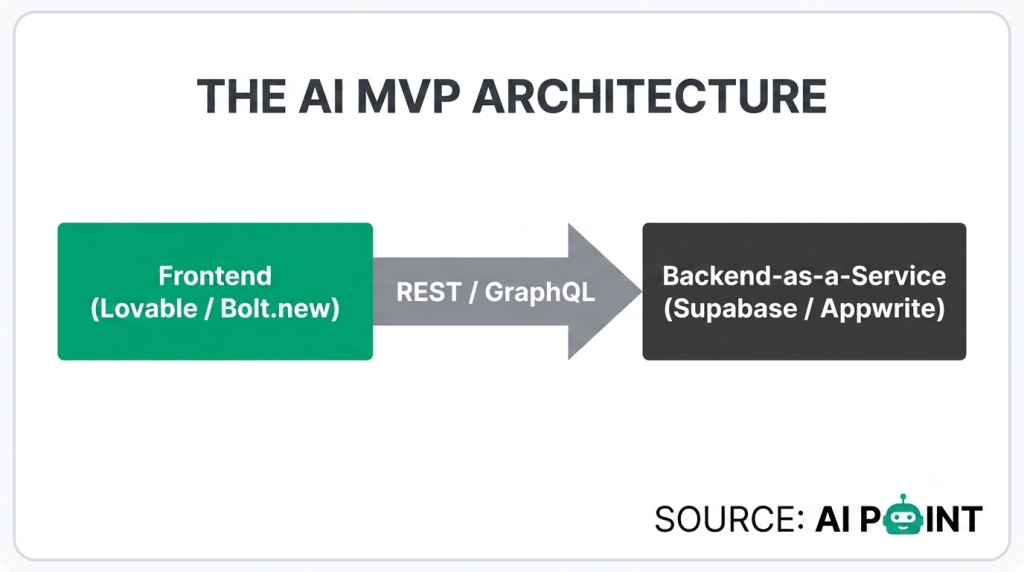
You split the workload. You use an AI builder for the frontend, and a specialized Backend-as-a-Service (BaaS) for the database.
Here is the step-by-step workflow:
Step 1: Generate the Frontend Use a tool like Lovable or Bolt.new to rapidly build out all your user interfaces. Focus purely on how the app looks and how the user navigates between pages.
Step 2: Connect the Backend (BaaS) Don’t try to make the AI builder manage complex server infrastructure. Instead, spin up a database using Supabase or Appwrite. These platforms give you instant databases, user authentication, and secure file storage out of the box.
Step 3: Wire Them Together Prompt your AI builder to connect to your Supabase project using their API keys. You simply tell the AI: “When a user clicks ‘Sign Up’, send their email and password to Supabase.”
It really is that simple.
For a complete, step-by-step breakdown of this exact process—including the exact prompts you need to use—check out our deep dive on building and launching MVPs using AI code assistants.
Local AI and Edge Computing: SLMs vs. LLMs
Let’s talk about infrastructure.
Cloud-based AI is incredible. But it has one massive, glaring flaw.
Latency.
When you are deep in a vibe coding session, waiting even two seconds for the AI to process a command feels like a lifetime. Plus, sending your proprietary product ideas or codebase to a third-party server can be a major security risk.
That is exactly why developers aren’t just relying on massive cloud models (LLMs) anymore.
Instead? They are shifting to Small Language Models (SLMs).
Small Language Models are lightweight. They are designed to run locally, right on the edge (your own machine or device).
The benefits are huge.
You get blazing fast, zero-latency generation. And because the data never leaves your laptop, you maintain complete privacy over your code.
But here is the kicker:
This doesn’t mean massive Large Language Models are dead. Not even close.
The smartest growth and product teams in 2026 are using a hybrid approach.
They use local SLMs for quick, everyday coding tasks and instant autocomplete. Then, they only route the heavy lifting—like complex reasoning and deep system architecture—to massive cloud LLMs.
It is the absolute best of both worlds: speed and power.
Want to know which setup is right for your next build? Check out our complete breakdown on SLMs vs LLMs for edge computing to see exactly how to structure your dev environment.
Conclusion: The Future of the “Developer”
Here’s the bottom line:
AI isn’t replacing developers.
But it is replacing the act of typing code.
The winners in 2026 aren’t the people who memorize the most syntax. The winners are the ones who adapt to managing AI agents.
You must shift from being a manual typist to a product director.
So, what should you do next?
It’s time to take action.
Pick just one tool from this guide—like Cursor, Lovable, or Bolt.new.
Set aside a few hours this weekend.
And build a simple project entirely from scratch.
The future belongs to the builders. Now, get out there and start shipping.
