

f you’ve ever tried to build a full-stack application using AI, you already know the painful truth.
AI is incredible at writing isolated functions.
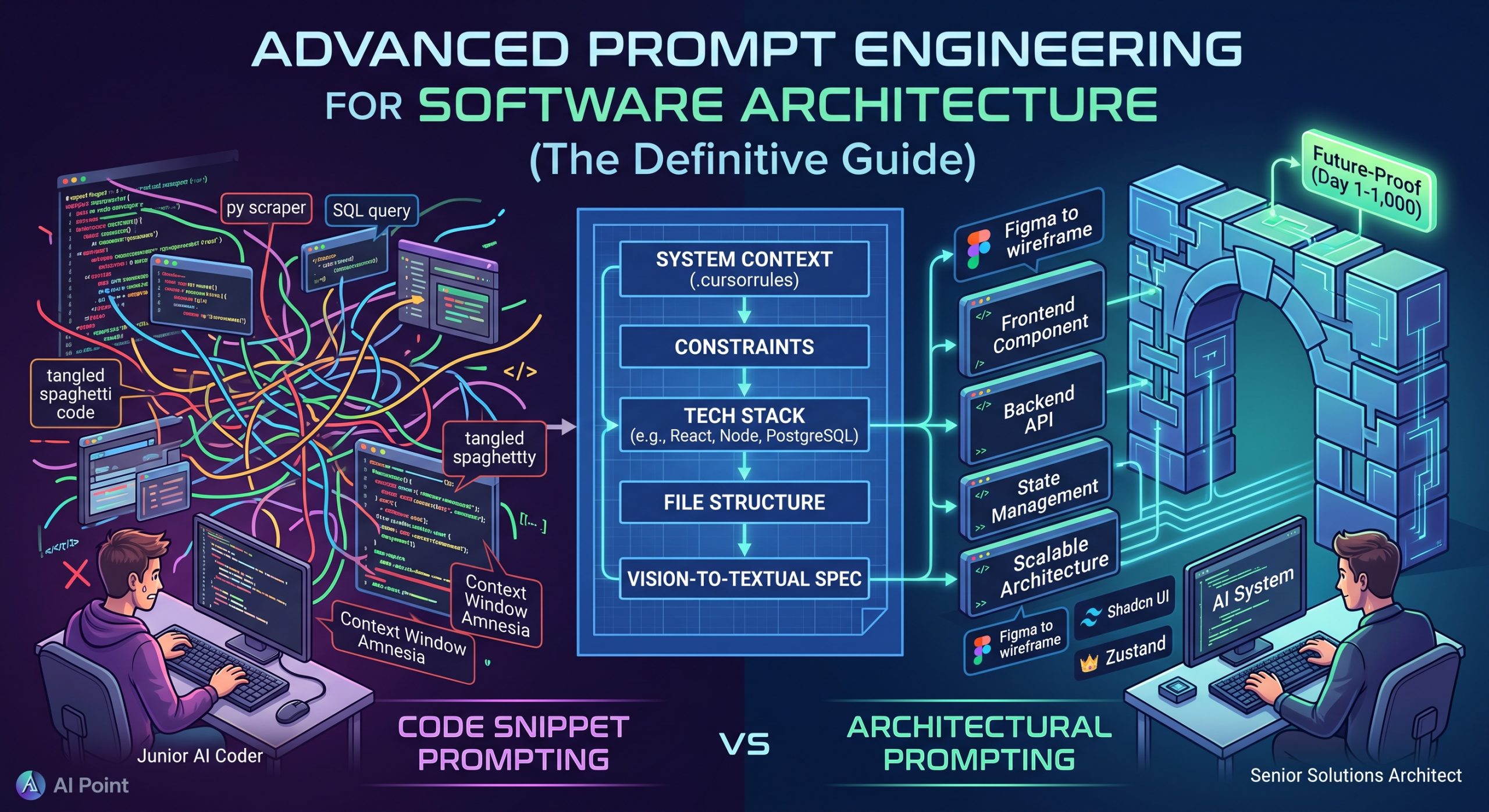
Need a Python script to scrape a website? Done in 10 seconds. Need a SQL query for a PostgreSQL database? Flawless.
But what happens when you ask it to build a scalable, multi-file application?
It usually spits out a hallucinated, tangled mess of spaghetti code.
You end up spending more time debugging the AI’s mistakes than you would have spent just writing the code yourself.
Here’s the deal:
The problem isn’t the AI. The problem is your prompts.
Most developers treat LLMs like junior coders. But to get enterprise-grade software, you need to force the AI to think like a Senior Solutions Architect.
In this definitive guide here at AI Point, I’m going to show you exactly how to do that.
You are going to learn a systematic framework for architectural prompt engineering. We will cover everything from setting strict operational rules to reverse-engineering wireframes and preventing the dreaded “Day 3 Code Rot.”
Let’s dive right in.
Chapter 1: The Shift from “Code Snippets” to “Software Architecture”
Let me know if this sounds familiar.
You open up Claude, ChatGPT, or Cursor.
You type in: “Build me a SaaS dashboard using React, Node.js, and PostgreSQL.”
The AI aggressively starts generating files. You copy, you paste, you run the server.
And… it crashes.
Why does this happen?
Because of a phenomenon I call Context Window Amnesia.
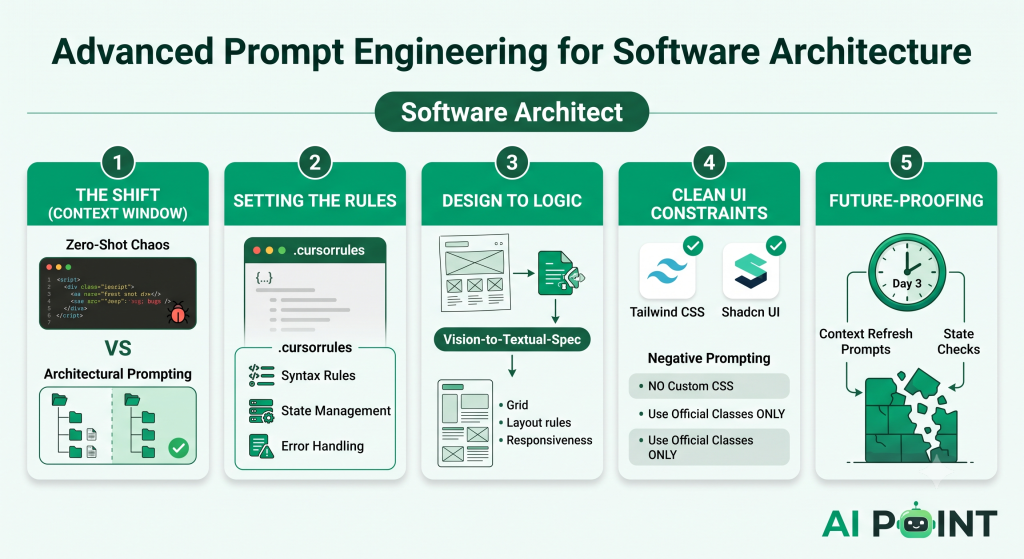
When you ask an AI to build a massive project in a single prompt (Zero-Shot Prompting), it loses track of the global architecture. It forgets how the frontend state management connects to the backend database schema.
It starts guessing. And when AI guesses in software architecture, things break.
The Solution? Architectural Prompting.
Architectural Prompting is a complete paradigm shift.
-
The Old Way: Asking the AI to “write code.”
-
The New Way: Asking the AI to “execute a predefined system design.”
When you use Architectural Prompting, you are no longer a coder dictating loops and variables. You are the Architect. You hand the AI a blueprint, and it acts as your hyper-competent construction crew.
Here is the exact hierarchy you need to use for every major project:
-
Context: What are we building and why?
-
Constraints: What are the absolute limits of the tech stack?
-
Tech Stack: Exactly which versions, libraries, and frameworks are allowed?
-
File Structure: Where does every single file live?
-
Execution: The step-by-step order of operations.
If you skip even one of these steps, the AI will fill in the blanks with hallucinations.
But when you lock these five pillars in place? The AI transforms from a chaotic junior dev into a disciplined machine.
And that brings us to the most important step: setting the rules.
Chapter 2: Setting the Rules of Engagement
Before a single line of code is written, the AI needs a strict operational boundary.
Think about it.
If you hire a new developer, you don’t just point them to a blank repo and say, “Go.”
You give them onboarding documents. You show them your linting rules. You explain your preferred folder structure.
You need to do the exact same thing for your AI.
This is where System Context comes in.
System Context is the invisible fence that keeps your AI from wandering into the woods. It stops the AI from importing random deprecated libraries or mixing inline CSS with Tailwind classes.
To do this effectively, you have to hardcode your rules directly into your workspace.
If you are using modern AI IDEs, this is done using rules files.
Want the exact blueprints for this? You can’t expect the AI to know your preferred architecture unless you codify it. This is exactly why rules files are your secret weapon. Check out my full deep-dive on this right here: The “System Context” Framework: How to Write Rules Files (.cursorrules) That Actually Work.
In that spoke guide, I break down exactly how to format these files.
But to give you a quick taste, a perfect rules file must dictate:
-
Syntax Preferences: (e.g., “Always use ES6 arrow functions. Never use
var.”) -
State Management: (e.g., “Only use Zustand for global state. Do not use Redux.”)
-
Error Handling: (e.g., “Wrap all async calls in try/catch blocks and log to a custom error handler.”)
When you lock these rules in at the root level of your project, the AI reads them before every single prompt.
It never forgets. It never deviates.
It just executes your exact vision.
Chapter 3: Bridging the Gap Between Design and Logic
Okay, so your environment is locked down.
Your rules are set.
Now, how do we translate visual ideas in your head (or in Figma) into flawless, logical code?
Here is the brutal truth:
Most developers are terrible at describing UI to AI.
They write prompts like: “Make a modern navbar with a logo on the left and login buttons on the right.”
The AI reads that, tries its best, and gives you a broken flexbox that looks terrible on mobile.
To get perfect code, you need to learn how to translate a visual wireframe into an exact, machine-readable specification.
I call this the Vision-to-Textual-Spec Method.
Instead of describing how it looks, you describe how it behaves. You have to break the UI down into structural trees before the AI touches a single component.
Ready to master this translation process? I’ve documented my exact framework for turning mockups into machine-ready specs. Read the full step-by-step breakdown here:Reverse-Engineering App Specs: Turning Wireframes into Perfect Prompts.
Here is a quick example of what a structural prompt looks like compared to a lazy prompt.
The Lazy Prompt (Fails 90% of the time): “Make a hero section with a big headline and two buttons.”
The Architectural Prompt (Works 100% of the time): “Build a Hero Component. Layout: CSS Grid. Mobile: 1 column. Desktop: 2 columns (Text left 60%, Image right 40%). Typography constraints: Headline is H1, tracking-tight. Interactions: Primary button triggers a modal. Secondary button scrolls to #pricing.”
See the difference?
The first prompt forces the AI to guess your design. The second prompt gives the AI a mathematical formula to follow.
And when you give AI a formula, it rarely misses.
Chapter 4: Pixel-Perfect Frontend Execution
Architecture? Done. Specs? Finished.
Now, let’s talk about the actual UI generation.
If you are a modern full-stack developer, you are likely using utility-first CSS frameworks and headless component libraries.
Specifically: Tailwind CSS and Shadcn UI.
They are incredibly powerful. But there is a massive catch when it comes to LLMs.
AI notoriously hallucinates UI utility classes.
Because Tailwind is so vast, an unconstrained AI will just start inventing classes that don’t exist in the framework. It will try to use margin-top-12px instead of mt-3.
Or worse, it will try to build a complex accessible dropdown menu from scratch using vanilla JavaScript instead of just pulling the pre-built Shadcn component.
Building a clean UI requires strict, unbreakable constraints.
Want my exact copy-paste prompts for flawless UI? Stop fighting with broken flexboxes and hallucinated padding. I’ve compiled my best constraint techniques here: Prompting for Clean UI: Forcing AI to Output Perfect Tailwind and Shadcn Components.
To give you a preview of how we enforce this, you have to use “Negative Prompting.”
Negative Prompting is when you explicitly tell the AI what it is not allowed to do.
For example, when generating a frontend component, your prompt should include a block like this:
Constraints: – Do NOT write custom CSS. – Do NOT invent Tailwind classes. Only use official Tailwind v3+ utility classes. – For interactive components (Modals, Dropdowns, Tabs), you MUST use Shadcn UI API structure. – Ensure all components are fully responsive using ‘sm:’, ‘md:’, ‘lg:’ prefixes.
By fencing the AI in with these negative constraints, you eliminate 99% of frontend hallucinations. You get pixel-perfect, accessible, and easily maintainable UI components right out of the gate.
Chapter 5: Future-Proofing AI-Generated Codebases
So, your app is built.
It looks great. The architecture is solid. It works perfectly on Day 1.
But what happens 72 hours later?
What happens when you come back on Day 3 and ask the AI to add a new billing feature to the user dashboard?
Welcome to the Cascade Failure.
This is the silent killer of AI development. On Day 3, the context window resets. The AI forgets the initial architecture you worked so hard to establish.
You ask for a new feature, and the AI confidently overwrites working logic. It introduces circular dependencies. It duplicates state management across three different files.
Suddenly, your pristine app is a broken mess.
If you’ve built an AI app, you know this honeymoon phase ends quickly. But it doesn’t have to be this way.
Want to stop code rot in its tracks? Here is exactly why your architecture crumbles over time, and the daily maintenance prompts you need to stop it: Why Your AI Code Starts Breaking on Day 3 (And the Prompts to Fix It).
The secret to future-proofing your codebase relies on two specific prompt types:
1. Context Refresh Prompts Every time you start a new session with your AI, you cannot just jump into coding. You must re-establish the baseline. You need a prompt that says: “Analyze the current directory structure and state management flow before suggesting any new code.”
2. State Checks Before the AI executes a massive refactor, force it to map out the consequences. Ask it: “If you implement this billing feature, list every single file that will be impacted and explain how you will prevent breaking the current authentication flow.”
By forcing the AI to slow down and map out its actions, you protect your codebase from the Day 3 Cascade Failure.
You maintain the integrity of your architecture from Day 1 to Day 1,000.
Conclusion
Building scalable software with AI is no longer a pipe dream.
But it requires you to step up.
You can no longer act as a lazy prompt generator asking for isolated snippets. You have to become an Architect.
By defining your System Context, reverse-engineering your wireframes, enforcing UI constraints, and utilizing Context Refresh Prompts, you can force any LLM to build enterprise-grade software that actually lasts.
Now I want to turn it over to you:
Which of these architectural prompting strategies are you going to try first?
Are you going to lock down your workspace with a .cursorrules file? Or are you going to focus on reverse-engineering your visual wireframes into text specs?
Let me know by leaving a quick comment below right now.
