

Video is eating the internet.
You already know this.
But if you are a developer, technical marketer, or founder, you also know the dark side of video content:
It is incredibly hard to scale.
Making a single high-quality video requires scripting, recording, editing, rendering, and publishing. It is a massive bottleneck.
But what if you could skip the studio entirely?
What if you could generate hundreds of personalized, broadcast-quality videos using a few lines of code?
Welcome to the era of programmable media.
By combining large language models (LLMs) with modern AI video and voice APIs, you can turn text into high-fidelity video on the fly.
In this guide, you are going to learn exactly how to build automated media pipelines. We will break down the exact tech stack, the code-level workflows, and the developer strategies you need to scale video production from one to one million.
Let’s dive right in.
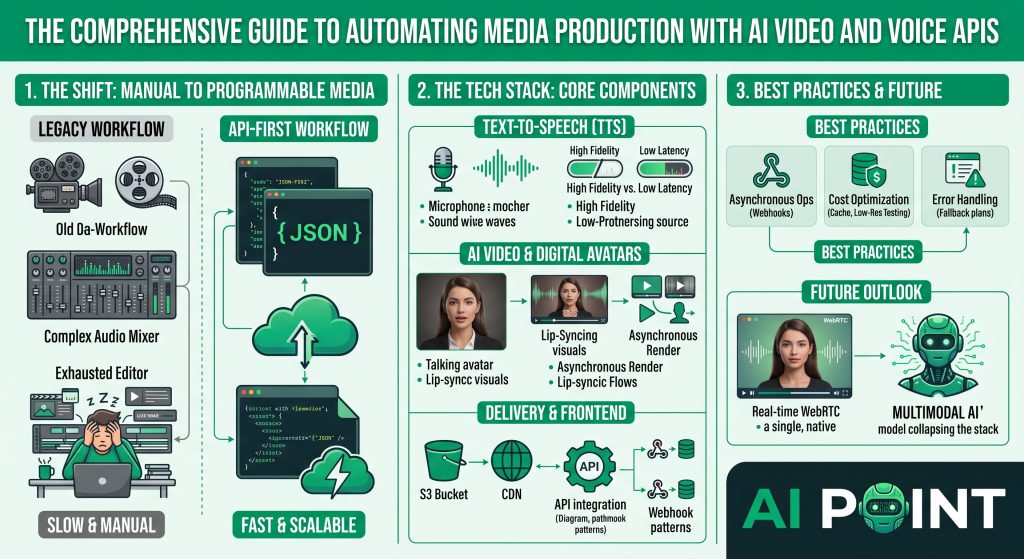
The Shift from Manual Editing to Programmable Media
Let’s be honest.
The traditional video production workflow is stuck in the past.
If you want to create content today, you are likely dragging files around a timeline in Premiere Pro, syncing audio tracks by eye, and waiting hours for exports.
It is manual. It is slow. And worst of all? It does not scale.
If you want to change one word in a video script, you have to re-record the audio and re-render the entire project.
Enter the API-first approach.
With programmable media, media is just code.
Instead of opening video editing software, you send a JSON payload to an API.
You pass a script to an endpoint. The API processes the text, generates synthetic human speech, maps it to a photorealistic digital avatar, and returns a fully rendered MP4 file.
The benefits of this paradigm shift are massive:
-
Zero Marginal Cost: Once your Python or Next.js script is written, generating 1,000 videos costs roughly the same time and effort as generating one.
-
Speed to Market: You go from idea to published video in minutes, not days.
-
Infinite Personalization: You can generate a unique video for every single user, greeting them by name.
You are no longer a video editor. You are a media engineer.
Core Components of the AI Media Tech Stack
To build a fully automated pipeline, you need to understand the building blocks.
This isn’t about using drag-and-drop web interfaces. This is about stringing together endpoints to create a headless media engine.
Here is the exact stack you need.
Text-to-Speech (TTS) and Synthetic Audio
The foundation of any AI video is the voice.
And the state of modern TTS is mind-blowing. We have officially moved past the robotic, monotone voices of the 2010s.
Providers like ElevenLabs, OpenAI TTS, and Play.ht can now generate audio that breathes, pauses, and expresses genuine human emotion.
But as a developer, you have to balance two things: latency vs. fidelity.
If you are building a real-time conversational agent, you need models optimized for speed. If you are generating a news update or an explainer video, you want the highest fidelity possible.
For a deeper technical dive on setting up custom voice profiles, check out our guide on voice cloning for developers and high-fidelity audio generation workflows.
But having a good voice model isn’t enough. You have to tell it how to speak.
Raw TTS needs direction. You can’t just pass raw text and expect a masterpiece. You need to use tools like SSML (Speech Synthesis Markup Language) and prompt engineering to control the output.
To get the most out of these models, you need to master prompting for synthetic voice emotion and realistic pacing.
AI Video Generation and Digital Avatars
Once you have your audio, you need visuals.
This is where avatar APIs come in. Tools like HeyGen, Synthesia, or D-ID take your generated audio file and map it to a digital human.
Here is how the mechanics actually work:
-
You upload a source image or select a pre-trained avatar.
-
You pass a public URL of your generated audio file (or send base64 data).
-
The API runs a lip-syncing algorithm to perfectly match the avatar’s mouth movements to the phonemes in the audio.
Orchestrating these API calls requires a robust, scalable pipeline. You are dealing with large files and asynchronous rendering.
Learn step-by-step how to automate video creation pipelines using the HeyGen API to string these complex components together without dropping requests.
Delivery and Frontend Integration
So, you generated a video. Now what?
You have to get it to your users.
Most video APIs will return a temporary download URL. You should never serve this directly to your frontend.
Instead, your backend needs to grab that MP4, upload it to an S3 bucket or a database like Supabase storage, and serve it through a CDN.
If you are building this into a web app, modern frameworks make this seamless. But what about mobile?
Consumers are increasingly expecting real-time video features right on their phones. If you are building for iOS or Android, read our breakdown on integrating AI lip-syncing and avatars into mobile applications.
High-Impact Use Cases for Automated Media
Now that you know the tech stack, what can you actually build with it?
Here is the deal:
The companies winning right now aren’t just making “cool AI videos.” They are solving massive business problems.
Here are the most profitable use cases for programmable media.
Dynamic Ads & Social Media Marketing
Content is a volume game.
Whether you are running TikTok ads or managing an automated YouTube channel, you need high output.
Brands are using APIs to generate thousands of ad variations. They change the script, the hook, the background, and the language—all programmatically—and A/B test them at scale.
Are you running a fast-paced news update channel or a faceless story brand? You can completely automate your daily posting schedule.
Want to build this yourself? Follow our comprehensive tutorial on building a fully automated short-form video generator for TikTok and YouTube Shorts.
Personalized E-Learning and Onboarding
Imagine a company with a massive software product.
Every time they update the UI, their tutorial videos become outdated. Historically, this meant re-recording hours of footage.
With programmable media, the training modules are tied to a text file. When the documentation changes, a webhook triggers the video API, and a fresh, updated video is generated instantly.
Global Localization and Dubbing
This is perhaps the biggest quick win in AI media.
You have a successful video in English. You want to launch it in Spain, Japan, and Brazil.
Instead of hiring voice actors, you build a script that:
-
Transcribes the original video.
-
Translates the text using an LLM.
-
Generates localized audio using the original speaker’s cloned voice.
-
Re-syncs the video to match the new language perfectly.
One video becomes a global asset in minutes.
Architecting the Automated Workflow: Best Practices
Building an API call is easy. Building a fault-tolerant production system is hard.
When you are dealing with heavy media generation, things will break. Here is how to architect your system like a pro.
Handling Asynchronous Operations
Video rendering is not instant.
If you generate a two-minute video, it might take five minutes to render. Your application cannot just hang and wait for an HTTP response.
You need to use webhooks.
When you send a request to a video API, it returns an ID. You save that ID to your database (like PostgreSQL). When the video is done, the API fires a webhook to your server (e.g., a Python backend).
Pro Tip: Use tools like ngrok to test your webhook receivers locally before pushing to production.
Cost Optimization
AI video APIs are not cheap. They usually charge by the second or minute of generated video.
If your code is sloppy, you will burn through your credits fast.
Here are three ways to cut costs:
-
Cache aggressively: If an audio snippet or a B-roll background is used multiple times, generate it once and store it. Don’t re-render static assets.
-
Test in low-res: Always use standard definition or test-mode endpoints while developing. Only switch to 1080p or 4K when pushing to production.
-
Validate scripts: Before sending a script to an expensive avatar API, run it through a cheap LLM check to ensure it meets length and content guidelines.
Error Handling & Fallbacks
What happens when the API goes down? Or when an LLM generates a script that is 5,000 words long and times out the renderer?
Your app needs a fallback plan.
Implement exponential backoff for failed API requests. If a video fails to generate after three tries, gracefully fallback to serving a static image with text, or standard TTS audio without the avatar.
Never let a third-party API outage break your user experience.
The Future of API-Driven Media
The tech stack we just covered is powerful. But it is already evolving.
Right now, we largely rely on asynchronous rendering. You ask for a video, you wait, you get an MP4.
The next frontier is real-time streaming avatars.
Using WebRTC, APIs will stream avatar video frames to the browser in real-time with sub-second latency. This turns a static video generator into an interactive, face-to-face AI agent.
Furthermore, native multimodal models are starting to collapse the tech stack. Soon, we won’t need a text API, an audio API, and a video API. A single model will process and output all three natively, cutting latency and complexity in half.
Conclusion
The transition from manual video editing to programmable media is happening right now.
By mastering text-to-speech APIs, digital avatars, and automated serverless workflows, you can build content engines that scale infinitely.
You have the blueprint. Now it is time to write the code.
Which part of the media stack are you going to automate first?
Let me know by diving into one of our deep-dive tutorials above, or start right now with Spoke 1: Automating Video Pipelines with HeyGen.
