

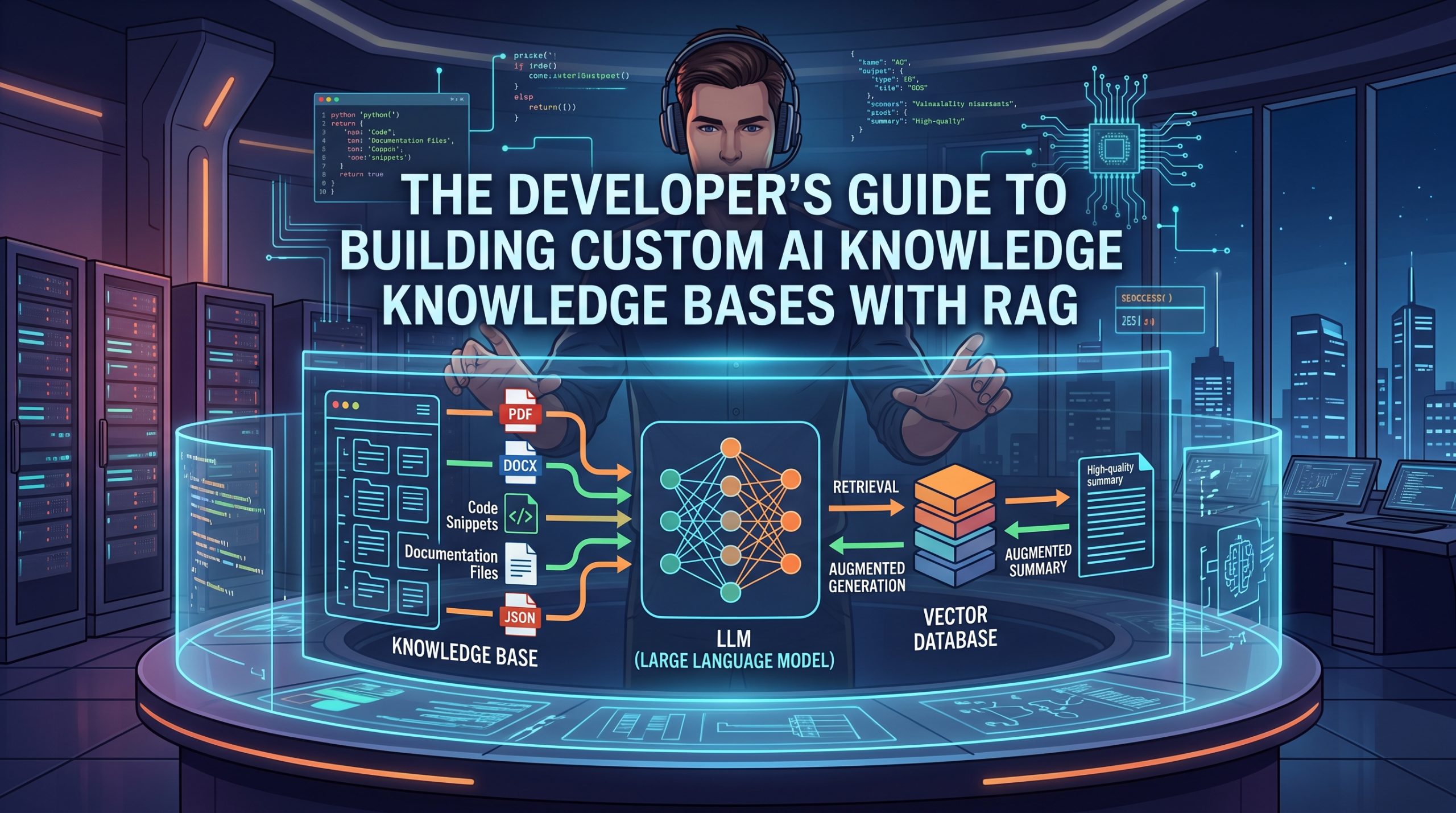
Large Language Models are incredible.
But they have a massive, glaring flaw.
They are frozen in time.
If you ask an out-of-the-box LLM about your company’s internal API docs, your private customer data, or a feature you launched yesterday, it will fail. It will either tell you it doesn’t know, or worse, it will confidently lie to you.
As a developer, you can’t ship an AI app that hallucinates. You need an AI that knows your specific data.
Here is the deal:
You don’t need to spend millions training a custom AI from scratch. And you don’t need to constantly update an LLM’s weights.
You just need RAG.
Retrieval-Augmented Generation (RAG) is the industry standard for grounding AI in dynamic, private data. It is the secret sauce behind almost every major enterprise AI tool on the market today.
In this guide, I’m going to show you exactly how to build a production-ready RAG pipeline from scratch. We are going to cover everything from raw data ingestion to vector storage, all the way to querying the database.
Let’s dive in.
How RAG Actually Works Under the Hood
Before we write a single line of code, we need to understand the architecture.
Most developers misunderstand how LLMs are supposed to be used in production. They treat the LLM like a database, expecting it to memorize facts.
That is the wrong mental model.
Instead, treat the LLM like a brilliant reasoning engine that just happens to have amnesia. It needs you to hand it the facts right before it speaks.
Think of it like an open-book test. You are giving the AI the exact pages it needs to read before it answers the user’s question.
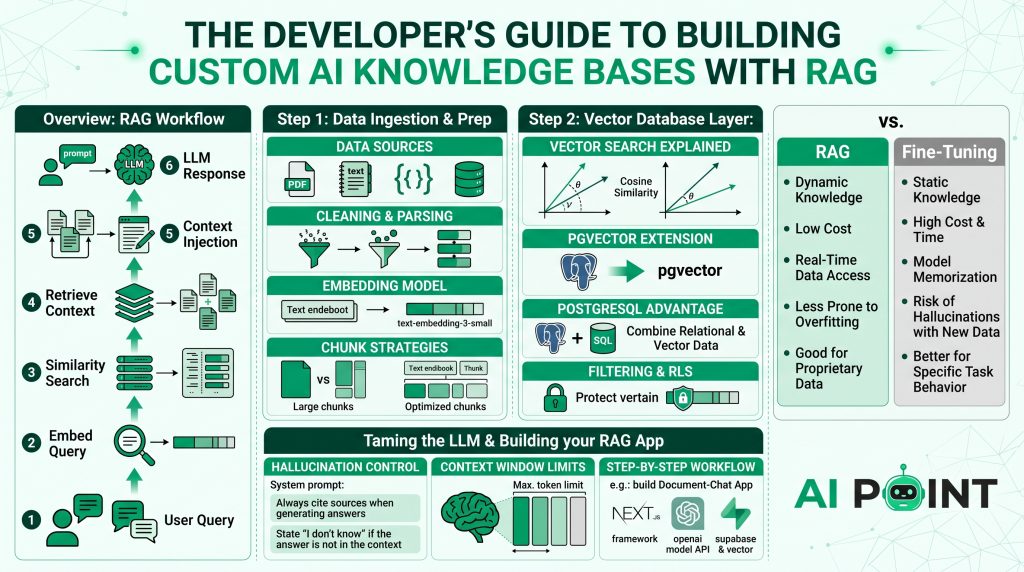
Here is the step-by-step pipeline of a standard RAG application:
-
The User Query: A user types a question into your frontend UI.
-
The Embedding Phase: Your backend takes that text query and converts it into a “vector” (a massive string of numbers representing semantic meaning).
-
The Similarity Search: Your system queries a specialized database to find stored documents that have vectors mathematically similar to the user’s query vector.
-
Context Injection: Your system grabs the text of those similar documents and injects them directly into the LLM prompt alongside the user’s original question.
-
Grounded Generation: The LLM reads the injected context and generates an accurate, highly specific response.
It sounds complex. But once you break it down into isolated systems, it is just data moving through a pipeline.
Let’s look at the very first step of that pipeline: ingestion.
Step 1: Ingestion and the Art of Data Preparation
This is where most RAG applications fail.
If you feed garbage to your LLM, it will confidently output garbage. You cannot simply dump a 500-page PDF or a raw SQL dump into an AI and expect magic.
The data must be cleaned, parsed, and meticulously prepared.
Embeddings 101
To make text searchable by an AI, we have to turn it into an embedding.
An embedding is just an array of floating-point numbers. Models like OpenAI’s text-embedding-3-small map the semantic meaning of text into a high-dimensional space.
Words with similar meanings are physically grouped closer together in this mathematical space. “Dog” is closer to “Puppy” than it is to “Carburetor.”
But here is the catch: you can’t embed an entire book at once.
The Chunking Problem
Embedding models have token limits. More importantly, if you try to embed a massive block of text, the specific semantic meaning gets diluted.
If you embed a whole page that talks about authentication, billing, and database schemas, the resulting vector won’t be highly relevant to a user asking specifically about billing. It’s too generalized.
On the flip side, if you chop your text up into tiny, single-sentence chunks, the LLM won’t have enough context to generate a coherent answer.
You have to find the Goldilocks zone.
This requires slicing your text into precise, manageable blocks. And it is arguably the most important step in the entire RAG workflow.
If your chunks are too large, the semantic meaning gets diluted. If they are too small, the LLM lacks context to form a coherent answer. To optimize this stage, you need to implement specific chunking strategies to prep your data for better AI retrieval.
Once your data is perfectly chunked and converted into vector embeddings, you need a place to put them.
Step 2: The Database Layer – Where Vectors Live
Standard relational databases don’t understand semantic meaning.
If you write a standard SQL query: SELECT * FROM docs WHERE content LIKE '%billing%';
You will only get results if the exact word “billing” is in the text. But what if the user asked about “invoicing” or “payment processing”? A standard WHERE clause fails.
You need a vector search.
Vector Search Explained
Instead of matching exact keywords, a vector search measures mathematical distance.
When a user searches for something, your app embeds their search query into a vector. Then, the database uses algorithms (like Cosine Similarity or Euclidean distance) to find the stored vectors that are closest in the mathematical space.
It doesn’t care about exact keywords. It cares about intent and meaning.
Choosing Your Database Stack
The AI hype cycle has spawned dozens of shiny, dedicated vector databases (like Pinecone, Weaviate, or Milvus).
These are great tools. But for most full-stack web applications, introducing an entirely separate, disconnected database just for vectors creates architectural headaches.
You have to sync your relational data (users, auth, billing) with your vector data across two different systems. It’s a nightmare for data consistency.
There is a better way.
Use PostgreSQL.
By utilizing the pgvector extension, you can store your high-dimensional embeddings right alongside your standard relational data.
This means you can filter vector searches by user IDs, apply standard Row-Level Security (RLS) policies, and keep your entire backend inside a unified ecosystem like Supabase.
For most full-stack applications, adding an extension to your existing PostgreSQL database is the most robust path forward. Here is exactly how to set up a vector database with Supabase pgvector to handle your embeddings alongside your standard auth and user tables.
RAG vs. Fine-Tuning: Making the Right Architectural Choice
At this point, a lot of developers ask a very valid question:
“Why do I need this complex RAG pipeline? Can’t I just fine-tune an open-source model on my data?”
This is the biggest misconception in modern AI engineering.
Fine-tuning is for form. RAG is for facts.
When to Use Fine-Tuning
Fine-tuning is when you adjust the actual underlying weights of an AI model by training it on thousands of examples.
You should use fine-tuning when you want to change the behavior, tone, or format of the output.
-
Want an AI that always responds in perfect JSON matching a specific Prisma schema? Fine-tune it.
-
Want an AI that speaks exactly like a 16th-century pirate? Fine-tune it.
When to Use RAG
You should use RAG when you want the AI to know new, dynamic information.
If your company updates its API documentation, you don’t want to spend $5,000 and 48 hours retraining an LLM just so it knows about the new endpoint.
With RAG, you simply update the vector database in real-time. The next time a user asks a question, the system pulls the updated context immediately. Furthermore, RAG allows you to cite your sources, showing the user exactly which document the AI used to generate its answer.
Before you commit weeks to building a massive data pipeline, take a step back and evaluate RAG vs. Fine-Tuning: Which approach does your AI app actually need? to ensure you are solving the right problem.
Taming the LLM: Accuracy, Security, and Hallucination Control
Let’s say you have your ingestion pipeline humming, and your Supabase vector database is returning perfect semantic matches.
You pass that context to the LLM.
You aren’t out of the woods yet.
The Danger of Confident Lies
RAG drastically reduces hallucinations, but it doesn’t eliminate them completely.
If a user asks a question, and your vector database retrieves irrelevant documents, the LLM will still try its best to answer the question using that bad data. The result is a highly confident, highly convincing, and completely wrong answer.
You have to build guardrails.
System Prompt Engineering
Your system prompt is your first line of defense. You need to explicitly instruct the LLM on how to behave when the context isn’t good enough.
Here is an example of a robust, hallucination-resistant system prompt you might use in your backend route:
Plaintext
You are a highly technical support assistant.
You will be provided with context from our official documentation.

Your rules:
1. You must base your answer ONLY on the provided context.
2. If the answer is not contained within the context, you must reply: "I do not have enough information to answer that."
3. Do not make up code, endpoints, or features.
4. Do not rely on your internal training data.

Context: {injected_retrieved_documents}
User Query: {user_query}
This strict framing forces the LLM to act purely as a synthesizer of the data you provide, rather than a creative writer.
However, controlling the prompt is only half the battle. You also need to manage token limits, prevent prompt injection, and filter out irrelevant data noise before it even reaches the LLM. Read our deep dive on how to prevent AI hallucinations using strict context windows to lock down your generation layer for production.
Putting It All Together: Your First RAG App
We’ve covered the theory, the database architecture, and the prompt engineering.
Now it is time to build.
The Modern AI Tech Stack
If you are building a modern web application today, you need a stack that is fast, scalable, and developer-friendly.
A highly effective, battle-tested stack for RAG looks like this:
-
Frontend & Framework: Next.js (React) for server-side rendering and fast API routes.
-
Database & Auth: Supabase (PostgreSQL) leveraging the
pgvectorextension. -
AI SDK: Vercel AI SDK for seamless streaming of LLM responses to the frontend.
-
Embedding Model: OpenAI
text-embedding-3-small. -
Generation Model: Anthropic Claude 3.5 Sonnet or GPT-4o.
By combining these tools, you can build an end-to-end RAG pipeline—from PDF upload to streaming chat UI—in a matter of days, not months.
Now that you understand the architecture, it’s time to write some actual code. Follow our comprehensive tutorial on building a document-chat app: a step-by-step RAG workflow to deploy your first custom knowledge base directly to production.
The Future of RAG and Conclusion
RAG is not a passing trend. It is the foundational architecture of the modern AI web.
But the technology is moving fast.
We are already seeing the rise of Agentic RAG, where the AI isn’t just given context blindly, but actually writes its own database queries, evaluates the results, and decides if it needs to search again before answering. We are seeing multi-modal RAG, where vector searches pull up images, charts, and video timestamps alongside text.
The best way to prepare for this future is to master the fundamentals today.
Don’t start by trying to build an enterprise-wide knowledge base. Start small.
Take a personal project—maybe your own blog posts, a few technical PDFs, or a specific codebase—and pipe it into a vector database. Build a simple UI. Get a feel for how chunk sizes affect retrieval quality.
Once you understand the flow of vectors, building intelligent, context-aware AI applications becomes second nature.
Keep building.
